

 Chloe Parker
If you work in cross-border e-commerce, overseas social media management, streaming, or web data collection, you’ve probably heard the term “native IP.” Many people search what is native ip, what is original ip, or what is origin ip — they’re all asking the same thing. In this guide, we’ll cover everything in one place: what a native IP actually is, how it relates to residential IPs and public IPs, how to check whether an IP is truly native, and how to buy a native IP without getting scammed.
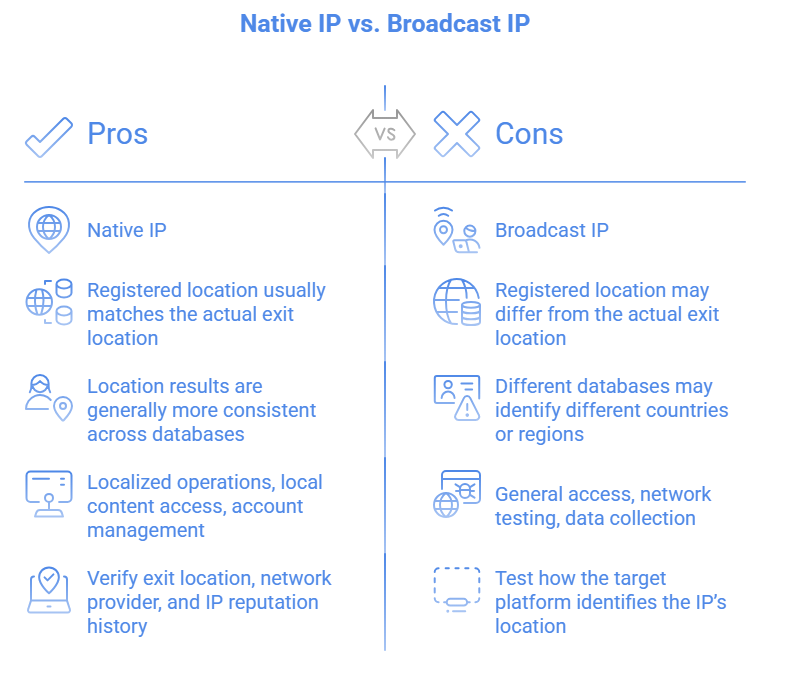
A native IP (also called an original IP or origin IP) is an IP address directly allocated by a local Regional Internet Registry (RIR) to a local carrier, where the IP’s registered country matches the country from which it is actually announced.
In other words, a native IP meets two conditions:
Registration location = usage location. For example, a US native IP is registered with ARIN as belonging to the United States and is genuinely announced and used by a US-based carrier.
It’s not a “broadcast” IP. Some providers register an IP in Country A but announce it from Country B. This is called a broadcast IP (or non-native IP) — technically it was “born” in one country but is now hosted in a data center elsewhere.
Once you understand this, several common English queries become clear: what is original ip, what is origin ip, and originating ip address all refer to “the original registered source of an IP,” while ip original is simply a common word-order variant used by searchers.
Incidentally, the phrase internet native is used in English mostly to describe a digital identity “born on the internet” — a concept closely related to native IPs: your IP is the proof of where your online identity originates.
Here’s a quick example:
You rent a “US server” from a cloud provider. The IP geolocates to the US, but the WHOIS record shows it was registered in Europe — that’s a broadcast IP.
A US native IP, by contrast, is both registered and announced within the United States. To a fraud-detection system, its “birthplace” and “current residence” are perfectly consistent.
For everyday browsing, both work fine. But for the anti-fraud systems behind Netflix, TikTok, Amazon, and PayPal, the difference is huge. These platforms simultaneously verify an IP’s registration country, announcement country, ASN type, and whether it belongs to a data center ASN. Broadcast IPs often get flagged as suspicious at the very first checkpoint.
Many people mix these concepts up. Let’s untangle them once and for all.
Residential IP: An IP allocated by a home broadband carrier (such as Comcast, AT&T, or China Telecom) to an ordinary household user. Its key trait is that it “looks like a real home user.” Residential IPs are also known as ISP IPs or home broadband IPs.
Native IP: Emphasizes that the IP’s registration country matches its actual usage country.
The two often overlap, but they are not equivalent: a residential IP can be a non-native IP announced into a data center, while a native IP can still be a data center IP.
The most expensive and most in-demand product on the market is the US native residential IP: registered in the US (native) and announced under a residential carrier (residential). The same logic applies to Canada native IP and other regions. If you’re running US-region accounts, and you’re choosing between a generic “US IP” and a “US residential IP,” always prioritize a US native residential IP.
Static residential IP: A residential IP that stays unchanged over time — ideal for businesses that need a stable login environment.
ISP proxy (ISP-hosted residential): An IP allocated directly by a carrier but hosted in a data center — sitting between data center IPs and residential IPs, balancing speed and cleanliness.
Users researching how to choose a static residential IP essentially want one thing: the cleanliness of a residential IP combined with the stability of a fixed address.
A public IP is defined in contrast to a private IP: a public IP is globally unique and directly routable on the internet, while a private IP (e.g., 192.168.x.x) only works within a local network and shares the public internet connection through NAT — this is the whole family of queries around public IP vs private IP.
A native IP emphasizes whether an IP’s registration matches its local attributes in the region where it’s used, whereas a public IP simply means the address is routable and accessible on the public internet. The two are not in conflict: an IP can be both a native IP and a public IP, but a public IP is not necessarily a native one. Judging this requires looking at the IP’s registration data, network ownership, and actual usage scenario together.
Simply put: a native IP must first be a public IP, but a public IP is not necessarily native. Your home broadband is a public IP, and so is a cloud server — but their “origins” are completely different. We’ll cover the full public IP vs private IP comparison in a dedicated article.
You buy a “US native residential IP” — but what you receive may turn out to be a broadcast IP. Testing is a non-negotiable step.
Common native IP check methods and tools:
IP WHOIS /IP-find.com — check the IP’s origin (registration country) versus its announced country; they must match for the IP to be native.
ipinfo.io / ip-api.com — check the IP’s ASN type to see whether it’s an ISP (residential) or hosting (data center) network.
Scamalytics / IPQualityScore — check the IP’s fraud/risk score and whether it’s flagged as a proxy or VPN.
Native IP checker tools — many IP providers offer one-click “native IP test” tools that instantly tell you whether an IP is native and which carrier it belongs to.
We recommend cross-validating across multiple sources. For US native IP testing in particular, confirm that both the registration and the announcement are in the US.
Streaming: Native IPs are valuable for regionalized testing of streaming services — content display checks, page localization, subscription plan verification, and playback quality monitoring. Teams serving multiple countries can use native IPs matching each target market to review local page rendering, language adaptation, and playback experience.
Cross-border e-commerce: Native IPs are useful for market research, price monitoring, and competitor analysis. E-commerce businesses can select native IPs for their target markets to view local product listings, price changes, promotions, and product detail pages — helping them analyze competitive landscapes and consumer trends in different markets.
Account operation and management: For registration and login environments on platforms like PayPal, Gmail, and various social networks, a premium IP significantly reduces verification prompts and suspension rates.
SERP ranking tracking: For SEO teams that need to analyze search results across countries, using a native IP that matches the target market gets you closer to the real local network environment — so you can accurately observe keyword rankings, SERP changes, and competitor page performance in a specific region.
Web data collection: For businesses collecting publicly available web data from specific countries or regions, using a native IP that matches the target market helps simulate the local network environment when gathering product prices, product information, search results, and market trend data.
Plenty of people search “native IP buy” or “residential IP buy.” Here are the key criteria:
Test before you pay. Ask the provider for a test IP and run it through the native IP check process described in Section 4.
Check the IP type. Prioritize products labeled as native residential IP, static residential IP, or ISP proxy — be wary of listings that only say “US IP” without clarifying the type.
Check purity. Ask whether the IP is dedicated. IPs in shared pools have often been used (and burned) by others.
Beware of prices that are too low. A genuine US native residential IP isn’t cheap. If the price is dramatically below market rate, it’s most likely a broadcast IP or a recycled second-hand IP.
Check after-sales support. A quality provider offers IP replacement on request, provides native IP testing tools, and has a clear refund policy.
As for “which static residential IP provider is best,” there are really only two criteria that matter: whether the IP passes a native IP test, and how clean its reuse rate and risk score are. Don’t just look at speed tests — purity is the core value.
One sentence to sum it all up: native IPs solve the “origin” problem, residential IPs solve the “identity” problem — and a native residential IP, which solves both, is the hard currency of overseas business. Before you buy, always run a native IP check across multiple tools, and don’t let a broadcast IP take your money posing as a native one.
Start your Cliproxy trial

Chloe Parker 2025-08-21 · 7 min read

Chloe Parker 2025-02-19 · 1 min read

Chloe Parker 2025-03-21 · 17 min read