


 Chloe Parker
Recently, a tool called Clawdbot has suddenly gone viral in the AI community. Many people are genuinely shocked the first time they read its introduction: it’s not just a chatbot—it’s an AI that can directly operate your computer.
So what exactly is Clawdbot? What can it do? And is it worth trying for ordinary users?
In this article, I’ll explain everything clearly and in plain language.
At its core, Clawdbot is an AI Agent with full computer access.
Unlike tools we commonly use such as ChatGPT or Claude, Clawdbot doesn’t just “answer questions.” Instead, it can behave like a real person and:
In one simple sentence:
Clawdbot is an AI tool that can actually do work for you—and communicate on your behalf.
Clawdbot currently supports integration with many popular overseas communication and productivity tools, including:
This means you can let it:
This is one of the core reasons why Clawdbot has recently exploded in popularity.
The biggest defining feature of Clawdbot is this:
👉 It doesn’t just think—it actually takes action.
Clawdbot can operate a computer just like a human, including:
It also has persistent memory, allowing it to remember context and long-term goals.
When combined with various Claude Skills, Clawdbot can handle real-world tasks such as:
Put more bluntly:
It’s an AI that’s free to work with its hands—and free to speak on your behalf.
Only AI like this—AI that can truly execute tasks—can be called a productivity liberation tool, rather than just a conversational companion.
There are even reports online of developers giving AI $2,000 USD to manage investments, turning it into a real productivity engine. With this, AI becomes even more powerful and practical.

⚠️ This is extremely important:
If you’re just experimenting with Clawdbot, do NOT provide any valuable personal information.
Why?
Strongly recommended:
Recommended environments:
⚠️ Windows may work in theory, but it has not been thoroughly tested—proceed with caution.
Simple Clawdbot installation guide
For experimentation, it’s best to install Clawdbot on a virtual machine, cloud server, or an old unused computer. The key point is:
👉 No personal privacy data or important files should be on that machine.
Then choose one of the following installation methods:
If Node.js is already installed (any OS):
npm i -g clawdbotStart Clawdbot with:
clawdbot onboardOn macOS or Linux, you can also run:
curl -fsSL https://clawd.bot/install.sh | bash⚠️ Due to limited Windows testing and unknown stability, beginners are not advised to try it on Windows.
After installation, there are two key configuration steps.
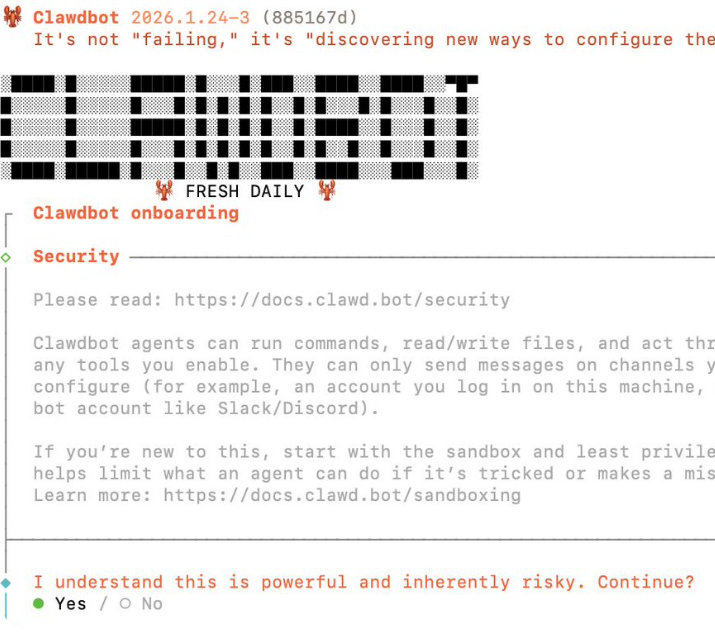
Run the configuration command in the terminal to enter the quick setup process.
The system will warn you about potential risks.
👉 Select yes to confirm that you understand and wish to continue.
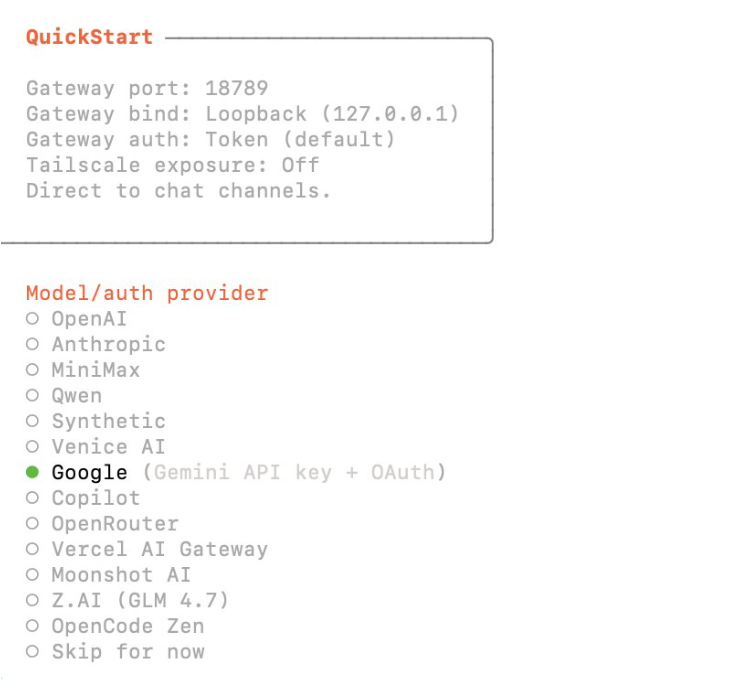
Next, you’ll need to:
This step determines Clawdbot’s “brain power.”
The final step is connecting a chat platform.
If you want to experience Clawdbot’s full capabilities, 👉 connecting WhatsApp first is strongly recommended.
The process is simple:
Overall, Clawdbot is best suited for:
❌ Not ideal for:
In real-world use, the importance of network environment and IP quality is often seriously underestimated.
One key point must be clear:
👉 Clawdbot is an AI Agent with real behavioral capability. It will:
From a platform’s risk-control perspective, this doesn’t look like “an AI test.” Instead, it looks like:
A user that behaves very much like a real human—but operates at extremely high frequency.
The likelihood of account restrictions or anomalies increases significantly when:
This is especially true when:
In these scenarios, IP anomalies often trigger risk controls faster than the actual actions performed.
Based on real-world testing and user feedback, Cliproxy’s native IP tend to work well in AI Agent scenarios, mainly because they offer:
Cliproxy is particularly suitable for users who:
Of course, this doesn’t mean you must use a proxy to run Clawdbot. Rather:
If you plan to use it seriously, long-term, and with minimal risk, your network environment is something you should prepare in advance.
Start your Cliproxy trial

Chloe Parker 2025-07-10 16:00 · 12 min read

Chloe Parker 2025-03-22 16:00 · 7 min read

Chloe Parker 2025-03-23 08:32 · 7 min read