

 Benjamin Carter
An IP address (Internet Protocol address) is a numeric identifier assigned to every device on an IP network. It uniquely locates that device so that data can travel from a source host to a destination host across the internet. Think of it as your device’s “street number” in the networked world.
By version, IP addresses come in two main families:
| Type | Bit length | Notation | Address capacity |
| IPv4 | 32 bits | Dotted-decimal, e.g. 192.168.1.1 | ~4.3 billion |
| IPv6 | 128 bits | Colon-hexadecimal, e.g. 2001:db8:85a3::8a2e:370:7334 | ~3.4 × 10³⁸ |
Practical note: Most home and office networks today carry both IPv4 and IPv6 addresses at the same time. If your router admin page shows two addresses with different prefixes, that is why.
An IP address serves two core functions in network communication:
Without an IP address, a device cannot be addressed and cannot communicate with other devices. This is the single biggest difference between “online” and “offline.”
An IPv4 address is 32 bits long. For human readability, it is split into four 8-bit segments (called octets), each converted to a decimal number between 0 and 255, and separated by dots. This is the familiar “dotted-decimal notation.” For example:
Binary   : 11000000.10101000.00000001.00000001
Decimal : 192.168.1.1
Those 32 bits are further divided into two logical parts:
Which bits are the network ID and which are the host ID is determined by the subnet mask. The most common subnet mask, 255.255.255.0, means the first 24 bits are the network ID and the last 8 bits are the host ID. In CIDR notation this is written as /24.
| Item | Dotted-decimal | Network ID | Host ID |
| Device IP | 192.168.1.10 | 192.168.1 | 10 |
| Subnet mask | 255.255.255.0 | 255.255.255 (first 24 bits = network) | 0 (last 8 bits = host) |
A bitwise AND operation between the IP and the subnet mask yields 192.168.1.0 — this is the “subnet address” the device belongs to.
In real-world engineering, IPv4 supports two addressing schemes:
There is more than one way to classify an IP address. The three most common dimensions are:
| Dimension | Public IP | Private IP |
| Definition | Globally unique on the public internet | Valid only inside a local area network (LAN) |
| Routable on the internet | Yes | No |
| How it’s assigned | By your ISP, or applied for from a regional registry | By a local DHCP server or network administrator |
| Common use cases | Web servers, mail servers, APIs, remote access | Home / office LAN devices |
| Uniqueness scope | Unique across the entire internet | Unique only within its own LAN |
| IPv4 reserved range | — | 10.0.0.0/8, 172.16.0.0/12, 192.168.0.0/16 |
| IPv6 reserved range | — | fc00::/7 (ULA, Unique Local Address) |
In a typical home broadband setup, the address your ISP gives to the optical modem / router is the public IP; the address your router hands to your phone or laptop is the private IP. That is also why “swapping the router” usually changes the IP you see from the outside, while the IPs of devices inside the LAN look almost the same.
Private IPs cannot reach the internet directly because they are not routed on the public internet. To let private-IP devices go online, you must use NAT (Network Address Translation) — the router maps every internal device’s “private IP + port” onto a single public IP. This is exactly what allows hundreds of home devices to share one public IP.
| Dimension | IPv4 | IPv6 |
| Address length | 32 bits | 128 bits |
| Capacity | ~4.3 billion | ~3.4 × 10³⁸ (theoretically one address per grain of sand on Earth) |
| Notation | Dotted-decimal, e.g. 192.168.1.1 | Colon-hexadecimal, e.g. 2001:db8::1 |
| Header | 20–60 bytes (with checksum and fragmentation fields) | Fixed 40 bytes (no checksum, no router-side fragmentation) |
| Security | IPSec optional | IPSec natively integrated (recommended) |
| Address assignment | DHCP (manual / automatic) | SLAAC by default, optional DHCPv6 |
| NAT needed? | Commonly used to ease address exhaustion | Designed end-to-end reachable, no NAT needed |
| Broadcast | Supports broadcast address | Broadcast removed, replaced by multicast |
| DNS record type | A record | AAAA record |
Because IPv4 addresses are nearly exhausted, ISPs worldwide are migrating to IPv6 through three transition mechanisms: Dual-Stack, Tunneling (6to4 / 6rd / ISATAP), and Translation (NAT64 / DNS64 / 464XLAT). The two protocols are expected to coexist for the long term.
| Dimension | Dynamic IP | Static IP |
| How it’s assigned | Assigned temporarily by a DHCP server; changes when the lease expires or on reconnect | Manually configured or DHCP-reserved; never changes |
| Changes over time | Yes | No |
| Cost | Usually included with broadband service | Public static IPs are typically billed extra |
| Best for | Ordinary home users, mobile devices | Web servers, mail servers, remote work, NAS, surveillance |
| Remote-access friendliness | Lower (needs DDNS) | High (a fixed address is all you need) |
Sponsored tip — Cliproxy: Cliproxy provides high-quality dynamic and static IPs for both personal and business use. New users can enjoy an exclusive 5% discount with code lZvJcWBLCm at checkout.
In the early days of IPv4, the address space was divided by the leading bits into five classes — the so-called classful addressing system. Class A was reserved for huge networks, B for mid-size, C for small. Class D was reserved for multicast, and Class E was held back for future use. Even though CIDR has long since replaced this on the public internet, understanding the five classes is still networking 101 — subnet-mask and gateway explanations all build on it.
| Class | Leading bits | First octet (decimal) | Default subnet mask | Network bits | Host bits | Number of networks | Hosts per network | Use case |
| A | 0 | 1–126 | 255.0.0.0 (/8) | 8 | 24 | 126 (2⁷−2) | 16,777,214 (2²⁴−2) | Very large networks |
| B | 10 | 128–191 | 255.255.0.0 (/16) | 16 | 16 | 16,384 (2¹⁴) | 65,534 (2¹⁶−2) | Mid-size networks |
| C | 110 | 192–223 | 255.255.255.0 (/24) | 24 | 8 | 2,097,152 (2²¹) | 254 (2⁸−2) | Small networks |
| D | 1110 | 224–239 | — | — | — | — | — | Multicast |
| E | 11110 | 240–255 | — | — | — | — | — | Experimental / reserved |
Note: The Class A network count subtracts 0.0.0.0 (this network) and 127.0.0.0/8 (loopback), yielding 2⁷−2 = 126. Hosts per network subtracts all-zeros (the network address) and all-ones (the broadcast address), yielding 2ⁿ−2.
Class A dedicates 1 byte to the network ID and 3 bytes to the host ID, so each Class A network can host up to ~16.77 million devices (2²⁴−2). The range is 1.0.0.0 to 126.255.255.255. The Class A private range is 10.0.0.0/8.
Class A dedicates 2 bytes to the network ID and 2 bytes to the host ID, allowing up to ~65,534 hosts per network. The range is 128.0.0.0 to 191.255.255.255. The Class B private range is 172.16.0.0/12 (172.16.0.0 to 172.31.255.255).
Class C dedicates 3 bytes to the network ID and 1 byte to the host ID, allowing up to 254 hosts per network. The range is 192.0.0.0 to 223.255.255.255. This is the most common class for homes and small businesses. The Class C private range is 192.168.0.0/16, which is also where the familiar home-router default addresses such as 192.168.0.1 and 192.168.1.1 come from.
Class D has no network/host split. It is dedicated to multicast — sending one copy of the data to a group of subscribers at the same time. The range is 224.0.0.0 to 239.255.255.255. Typical applications include IPTV, video conferencing, routing protocols (OSPF, RIP), and gaming multicasts.
Class E covers 240.0.0.0 to 255.255.255.254 and is reserved for experimental and future use. It is not allocated commercially.
The table below lists the “special” addresses you see often but cannot use as regular host IPs — these are also called reserved or non-routable addresses.
| Address / range | Purpose | Notes |
| 127.0.0.1 (127.0.0.0/8) | Loopback | Test traffic sent to your own machine; never leaves the NIC. Used for self-tests likeping 127.0.0.1 and local service tests. |
| 169.254.0.0/16 | Link-Local (APIPA) | Auto-assigned by Windows / macOS when DHCP fails; LAN-only self-rescue; cannot reach the internet. |
| 0.0.0.0 | This host / unspecified | “This machine”; often used by servers to bind all NICs or to mean “no specific route.” |
| 255.255.255.255 | Limited broadcast | All hosts on the local network; routers will not forward it. |
| x.x.x.255 | Directed broadcast | All hosts on a specific subnet (IPv4 only; removed in IPv6). |
| 192.168.0.0/16 | Class C private | Most common in home / small-office networks. |
| 172.16.0.0/12 | Class B private | Mid-size enterprise / corporate networks. |
| 10.0.0.0/8 | Class A private | Large internal networks. |
| 100.64.0.0/10 | CGNAT shared | Carrier-Grade NAT shared range used by ISPs for home broadband. |
| 198.18.0.0/15 | Benchmarking | Used for network equipment performance testing; ordinary traffic should never appear here. |
| 224.0.0.0/4 | Multicast | Class D range, used for multicast communication. |
| ::1 | IPv6 loopback | Equivalent to 127.0.0.1 in IPv4. |
| fe80::/10 | IPv6 link-local | Auto-generated on every IPv6 interface for local-link use. |
An IP address alone is just a number on a device. What actually carries data from A to B is the four-piece combo of IP address + subnet mask + default gateway + DNS.
Suppose your PC wants to visit www.example.com. Behind the scenes, this is what happens:
The core building blocks above are:
“Finding your IP” actually means two different things: your public IP (what the internet sees) and your private IP (what the router gave you on the LAN).
The simplest way is to open any of the following sites in a browser — the page will display your current egress public IPv4/IPv6:
You can also use the command line:
# Linux / macOS
curl ifconfig.me
curl ipinfo.io/ip

# Windows PowerShell
(Invoke-WebRequest -UseBasicParsing -Uri "https://ifconfig.me/ip").Content
Win + R, type cmd, run ipconfig, and look for “IPv4 Address.”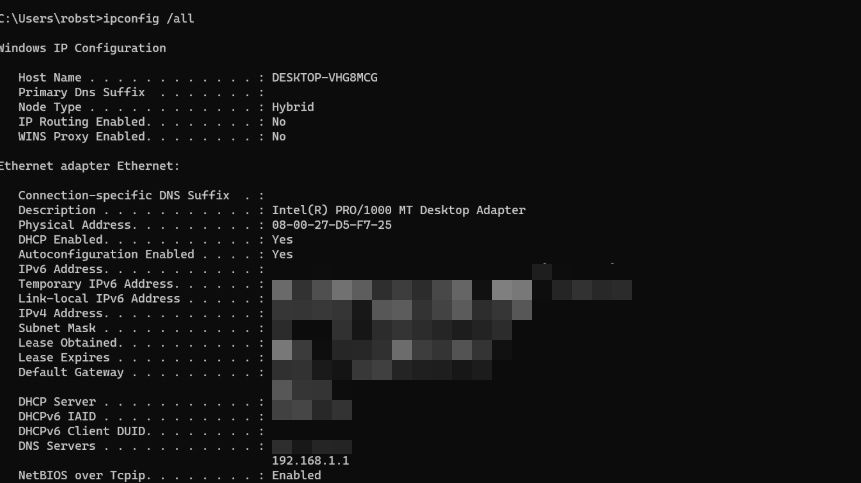
Tip: Phones sometimes show more than just the private IP — including the IPv6 address and the router address. The “router” or “gateway” entry is your router’s IP (usually 192.168.0.1 or 192.168.1.1). Open that address in a browser to access the router admin page.
If your public IP becomes known to an adversary — whether by accident or by deliberate probing — several classes of risk follow:
Technical reality: An IP address is not a “key that opens your computer,” but it is a critical link in the attack chain.
The following checklist goes from easiest to most advanced, and lets you ratchet up your IP privacy step by step.
about:config and set media.peerconnection.enabled = false.admin/admin) and enable WPA3 or WPA2 encryption.lZvJcWBLCm at checkout.Periodically visit the following sites to confirm that your IP is actually hidden:
An IP address is a logical address at the network layer. It can change as the network changes (e.g. switching Wi-Fi or restarting the router may give you a new IP). A MAC address is a physical address at the data-link layer, burned into the network interface card. In theory it is globally unique and does not change. In everyday communication the two cooperate: the IP locates the remote network, and the MAC pinpoints the specific device inside that network (with ARP / NDP handling the mapping).
IPv4 has only ~4.3 billion addresses. Since 2019, IANA and the major regional registries (APNIC / RIPE / ARIN) have progressively exhausted their IPv4 pools. In the short term, NAT keeps things alive by letting many devices share a single public IP. In the long term, IPv6 expands the address space to ~3.4 × 10³⁸ addresses and solves the problem at its root.
Yes — through NAT (Network Address Translation). The most common home scenario: all devices on the LAN have their private IPs translated to the same public IP by the router. On the return path, the router uses the port number to map back to the correct internal device. CGNAT (Carrier-Grade NAT) pushes this step further down into the ISP, so many households share the same pool of public IPs.
Both are Class C private IP addresses, used only inside a LAN and never seen on the public internet. Their most common use is as the default admin address of a home router. Type http://192.168.1.1\ or http://192.168.0.1\ in a browser, and a login page usually appears (default credentials are typically printed on the bottom of the router).
127.0.0.1 is the IPv4 loopback address. The operating system delivers any packet sent to this address back to the same machine without ever touching the physical network. It is the standard “local machine address” used in development and debugging (e.g. http://127.0.0.1:8080\) and for ping self-tests. Because packets never leave the host, external networks cannot directly attack 127.0.0.1. However, beware of other programs on the same machine: if malware is already running on the system, it can reach local services (such as a database) through 127.0.0.1. This is called a local-loopback attack.
Understanding IP addresses is not just useful for network engineers — it helps developers, product managers, security and operations staff, and ordinary users troubleshoot everyday connectivity problems. Mastering the main thread — structure → classes → special addresses → how it works → how to look it up → how to protect it — covers roughly 90% of the IP-related issues you will encounter in real work.
Start your Cliproxy trial

Benjamin Carter 2025-05-13 · 10 min read

Benjamin Carter 2025-05-17 · 13 min read

Benjamin Carter 2025-07-09 · 9 min read