


 Benjamin Carter
A static residential IP is a fixed IP address registered to a consumer internet service provider (ISP) that stays the same for as long as you hold it. Because it never changes, a target platform sees the same visitor returning across sessions.
Key takeaways
A static residential IP satisfies two conditions at once. First, it is registered to a consumer ISP rather than a hosting company — meaning the IP block’s ASN (autonomous system number, the registry record identifying who owns an IP range) belongs to a residential broadband operator. Second, it is assigned to you exclusively and never changes for the length of your contract. Your request goes to the provider’s gateway, exits through that address, and the target server logs a household broadband subscriber instead of a server.
From these two conditions follow two core values: the address never changes, and it is yours alone. That combination of stability and exclusivity is what makes static residential IPs well suited to account management, seller dashboards, and long-session automation — any workflow that needs a stable, long-lived identity.
Most guides present static, dynamic, rotating, datacenter, native and public IP as six alternatives to choose between. They are not. They describe three separate properties, and a single IP can be several at once. Sorting them by axis is the fastest way to stop misreading what an IP actually is.
| Axis | The question it answers | Terms on this axis | What it determines |
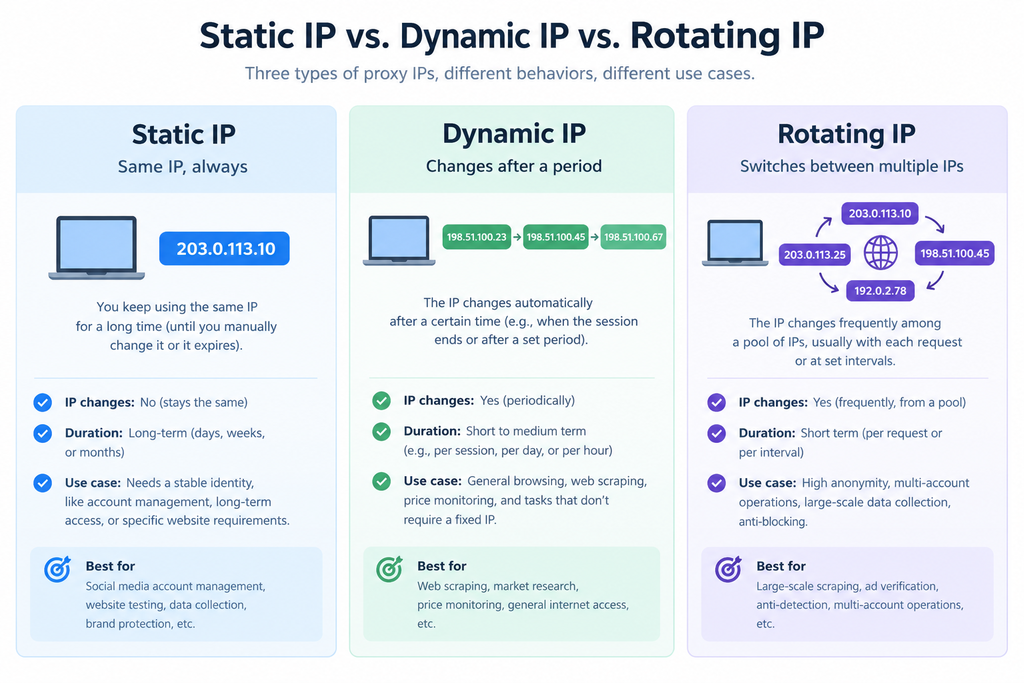
| 1. Lifetime | Does the address change, and who decides when? | Static / Dynamic / Rotating | Whether you can keep a fixed IP and a consistent identity |
| 2. Origin | Who owns the block, and does its registered geography match where traffic exits? | Residential / Datacenter / Native vs. non-native | The trust score you start with |
| 3. Reachability | Is the address publicly routable? | Public IP / Private (CGNAT, RFC 1918) | Whether you can take inbound requests and be uniquely identified |
An IP is only fully described with one answer from each axis. “Static residential” gives you lifetime and half of origin — it says nothing about whether the address is native or publicly routable, the two attributes that most often decide outcomes on social media platforms and ad delivery.
| Static | Dynamic | Rotating | |
| What changes | Nothing | The address changes when the consumer line reconnects | A new exit IP per request, per session, or on a timer |
| Who controls it | Fixed as assigned; nothing to control | The ISP’s DHCP lease or reconnect cycle | You, via the rotation session settings |
| Billing | Per IP / month | Per IP or per GB | Per GB |
| Price range | From $3.0 / IP / month, usually unlimited bandwidth | See official site | From $0.58/GB, traffic valid permanently |
| Best for | Accounts, seller dashboards, long-session automation, payments | Low-stakes collection where any consumer line will do | Scraping at scale, SERP and price monitoring, ad verification |
| Main weakness | Limited supply; a flagged IP has nowhere to rotate | Unpredictable; cannot hold a session | Cannot hold an identity; metered cost grows with volume |
Dynamic vs. rotating, clarified. A dynamic IP’s validity period is variable — the provider cannot guarantee a fixed, stable duration. Rotating, by contrast, emphasizes your control: you buy a rotating IP and set the session time yourself, triggering rotation on your schedule. This controllable change is why rotating IPs are so widely used in data scraping and information collection.
Datacenter IPs are owned by hosting and cloud providers and identified by a hosting ASN. They are the fastest and cheapest per IP, and the easiest for a target to detect. Right for internal QA, load testing, and undefended targets; wrong for identity-sensitive work.
Native vs. non-native is the check most buyers skip. A native IP’s registered geography matches where traffic actually exits: WHOIS country, ISP, and geolocation databases all agree, and the address has never been flagged as a hosting or IP exit. A non-native IP is registered in one place and exited from another — often datacenter ranges repackaged as residential. Platforms that verify registration consistency read the mismatch as a negative signal even when the ASN looks residential.
How to verify a native IP in under two minutes: check WHOIS, cross-check two independent geolocation databases, and confirm the ASN type reads as an ISP rather than a hosting provider.
Public vs. private (CGNAT) describes reachability, not stability. A public IP is globally routable and uniquely yours; a private or carrier-grade NAT address is shared behind a translation layer with unknown other users. You need public for IP whitelisting and inbound callbacks. A meaningful share of residential pools contains CGNAT addresses.
Note that these axes are independent and can overlap. For example, a static IP can sit behind CGNAT and be shared, and a public IP can rotate.
Vendors compete on one number. There are three, and the advertised one predicts the least:
A large pool that never refreshes decays: addresses accumulate block records and your success rate falls. So the best pool is never chosen by blind faith in marketing copy — the right way to buy is to start with a batch plan, test it, then scale up after the test passes.
Every provider claims the same numbers. Four metrics, measured on your real target over a weekend, usually settle it:
| Type | Billed by | Price range | The trap |
| Rotating residential | Per GB | From $0.58/GB, traffic valid permanently | Entry plans look cheap in total, but the per-GB rate can be higher than enterprise tiers |
| Static residential / ISP IP | Per IP / month | From $3.0 / IP, usually unlimited bandwidth | Limited supply; usually no replacement once in use |
| Datacenter | Per IP / month | Lowest of the four | Cheap per IP, but limited use cases |
| Mobile (4G/5G) | Per IP or per GB | Highest of the four | Expensive |
Prices shown are IP Providers published rates (September 2026). Prices are updated in real time; for the most up-to-date prices, please refer to the prices displayed on the official website you visit.
In commercial practice, almost always yes. Both describe an address from an ISP-allocated block hosted on server infrastructure rather than a home line. Genuinely device-hosted static residential IPs exist but are rare and priced accordingly.
Static residential is a fixed, unchanging ISP address. Its value is identity continuity — making the platform believe you are the same account as yesterday. The trade-offs: once flagged there is nowhere to rotate, supply is limited, and it is relatively expensive. Rotating residential draws a new address from a massive home-IP pool per request or session. Its value is footprint dispersion — no single IP stands out. The trade-offs: it cannot hold an identity, and per-GB billing gets expensive at scale. The deciding question is your use case: is this IP for a short-term scenario, or for long-term, continuous, stable use?
A native IP’s registered geography matches where traffic exits: WHOIS country, ISP and geolocation databases all agree, and the address has never been flagged as a hosting or IP exit. Verify by cross-checking WHOIS against two independent geolocation databases and confirming the ASN type reads as an ISP rather than a host.
No. Public vs. private describes whether the address is globally routable; static vs. rotating describes whether it changes. You need a public IP for whitelisting and inbound callbacks, and a static IP for session continuity.
The technology itself is legal; compliance depends on how you use it and where the IPs come from. Collecting public data, ad verification, and managing your own business accounts are legitimate uses. But using proxies to bypass paywalls, access systems without authorisation, or breach a target platform’s terms of service carries real legal risk. In short: the tool isn’t the crime — the use and the source define the line.
Classify your workload on the three axes — lifetime, origin, reachability — before you open a single pricing page. That classification tells you which type to buy and which checklist items actually move your bill.
Want to verify it yourself? Cliproxy offers new users free test traffic — contact online support to apply, and use coupon code lZvJcWBLCm for 5% off.
Start your Cliproxy trial

Benjamin Carter 2025-09-04 · 10 min read

Benjamin Carter 2025-04-13 · 8 min read

Benjamin Carter 2026-01-29 · 14 min read