


 Ethan Harris
In scenarios such as cross-border e-commerce, accessing overseas websites, social media operations, and data scraping, proxy servers are almost unavoidable tools. However, when many people first encounter proxies, they often face the same questions: What exactly is a proxy? Why do we need to configure it? And how can it be set up correctly?
This article will systematically explain proxy servers from principles → purposes → configuration methods → common mistakes, helping you quickly get started with proxy configuration.
A proxy server is, simply put, an “intermediary” that sits between you and the target website.
Under normal circumstances, the access path looks like this:
Your device → Target website
After using a proxy server, the access path becomes:
Your device → Proxy server → Target website
In this process, the website sees the IP address of the proxy server, not your real local IP.
You can think of a proxy server as someone who “goes online on your behalf”: it sends requests to websites for you and then forwards the returned data back to you.
The typical workflow of a proxy server includes the following steps:
Different types of proxies (HTTP, HTTPS, SOCKS5, residential proxies, data center proxies) vary slightly in implementation details, but the core principle is the same: IP replacement + request forwarding.
Proxy configuration refers to manually or automatically entering proxy server details in a system, browser, or application so that network traffic is routed through the proxy server.
Common proxy configuration details include:
As long as these details are filled in correctly, your network requests will be routed through the proxy.
Different users configure proxies for different reasons, but the most common ones include:
A proxy can effectively hide your real local IP, reducing the risk of account linkage, bans, and risk-control detection.
Many websites determine content access based on IP location. Proxies allow you to simulate overseas network environments.
On platforms like Amazon, Shopee, and eBay, multi-account operations require IP isolation, making proxies almost essential.
Platforms such as Facebook, Instagram, and TikTok have strict IP risk controls. Stable proxies help ensure long-term account security.
For high-frequency access, proxies enable IP rotation to avoid being blocked by target websites.
The proxy setup method depends on your use case and tools. Common approaches include the following:
Taking Chrome as an example:
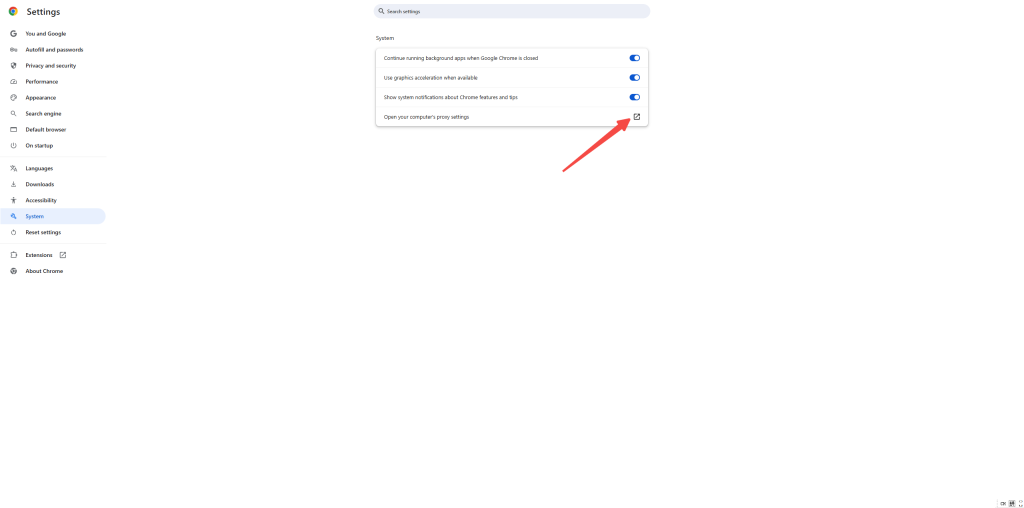
This method is suitable for simple testing or temporary use.
After setting a system proxy, all applications that use the system network will go through the proxy.
This is suitable for users who need a global proxy environment.
Common examples include proxy clients, fingerprint browsers, and data collection tools:
A detailed operation guide can be found here:
https://help.cliproxy.com/browser/adspower/?kwd=zz-blog
This is the most commonly used method for cross-border e-commerce and social media operations.
Suitable for users with technical experience:
When proxies “don’t work well,” it’s often not the proxy itself but incorrect configuration:
❌ 1. Incorrect IP or Port
Extra spaces or missing characters when copying can cause connection failures.
❌ 2. Mismatched Authentication Method
❌ 3. Incorrect Session Type Selection
❌ 4. Using One IP for Multiple Accounts
This is a high-risk operation that can easily lead to account linkage and bans.
❌ 5. Using Low-Quality Proxies
Polluted or heavily shared IPs can cause issues even if configured correctly.
Proxy servers are not complicated. At their core, they simply help you access the internet under a different identity.
As long as you understand how proxies work and configure them correctly based on your use case:
A proxy can become a stable, efficient, and long-term tool for your workflow.
Start your Cliproxy trial

Ethan Harris 2025-10-10 16:00 · 10 min read

Ethan Harris 2025-04-13 14:02 · 12 min read

Ethan Harris 2025-11-11 16:00 · 10 min read