


 Grace Turner
In digital marketing, social media management, and e-commerce operations, safely and efficiently managing multiple accounts while avoiding platform detection and bans has always been a challenge. Dolphin Anty (also known as Dolphin{anty}) was developed to address this need. As an advanced anti-detection browser, it offers powerful multi-account management, fingerprint protection, and automation features, making it one of the most noteworthy tools in 2025.
Dolphin Anty allows users to create multiple browser profiles, each with its own unique browser fingerprint, ip settings, and cookies. This enables simultaneous login to multiple social media accounts without being recognized as the same user, greatly reducing the risk of account bans.
For users engaged in Facebook advertising and social media operations, Dolphin Anty provides deep integration with Facebook. Users can directly manage multiple Facebook accounts within the browser, avoiding frequent logins and captcha verifications, which improves workflow efficiency.
Dolphin Anty allows users to add bookmarks for each profile, enabling quick access to frequently used pages. For example, users can create shortcuts to e-commerce platforms, ad management dashboards, and other commonly accessed tools, saving time and increasing efficiency.
Dolphin Anty offers basic automation features, including cookie collectors, synchronizers, and script support. Users can set up automated tasks to perform batch operations, streamlining workflows and boosting productivity.
Dolphin Anty supports multiple ip protocols, including HTTP, SOCKS5, and SSH. Here’s how to configure a Cliproxy :
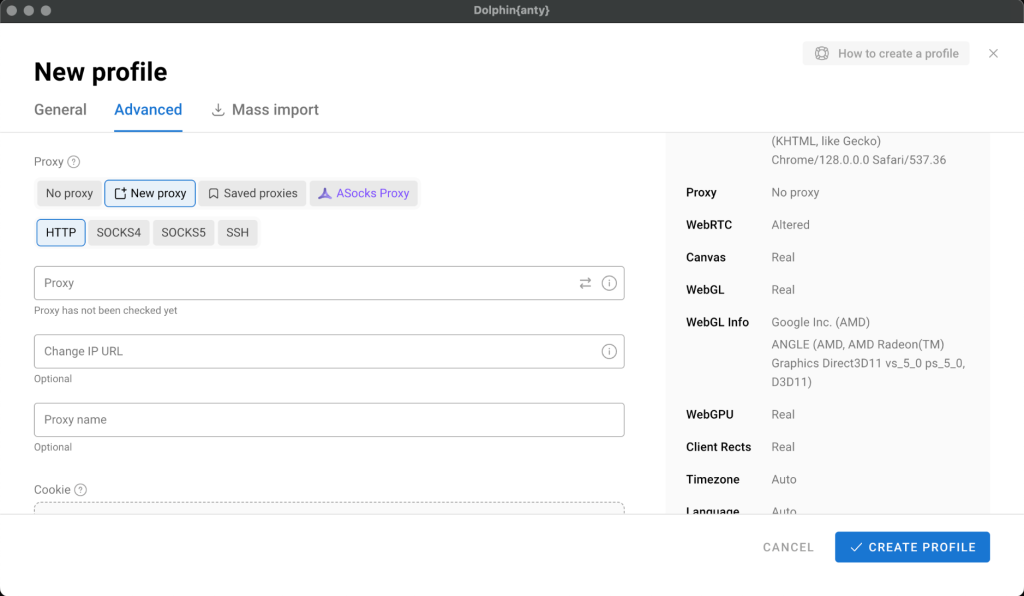
Following these steps allows users to successfully configure a Cliproxy ip in Dolphin Anty for secure multi-account management.
Dolphin Anty occasionally releases promotions and discount codes on its official website and social media channels. Follow the official sources to stay updated on the latest deals.
Dolphin Anty is widely used in social media management, advertising, and e-commerce operations. Its robust multi-account management and fingerprint protection features effectively address multi-login challenges and reduce the risk of account bans.
Currently, Dolphin Anty only supports Windows, macOS, and Linux operating systems. There is no official mobile version available.
Both Dolphin Anty and GoLogin are anti-detection browsers, but they differ in performance and features. User feedback indicates that Dolphin Anty offers better stability and speed on M1 processors compared to GoLogin.
Dolphin Anty offers a free plan, allowing users to create up to 10 profiles and access basic features. Users who need more profiles or advanced functions can opt for a paid plan.
Dolphin Anty is a powerful anti-detection browser suitable for users who need to manage multiple online accounts. Its multi-account management, fingerprint protection, and automation features make it an ideal choice for digital marketing and social media operations in 2025.
Start your Cliproxy trial

Grace Turner 2025-08-30 16:00 · 5 min read

Grace Turner 2025-03-16 05:18 · 17 min read

Grace Turner 2025-02-26 16:00 · 7 min read